HackTheBox CTF: Sequel
Sequel is a Very Easy Linux box focused entirely on MySQL enumeration. The attack path involves discovering an open MySQL port using Nmap, connecting directly to the database without credentials, enumerating the available databases and tables, and retrieving the flag through basic SQL queries — no exploitation required, just solid database enumeration skills.
Recon & Enumeration
I used Nmap to conduct a port scan and service enumeration against the target to see what was running and on which ports:
sudo nmap -sC -sV -Pn -T4 10.129.190.116
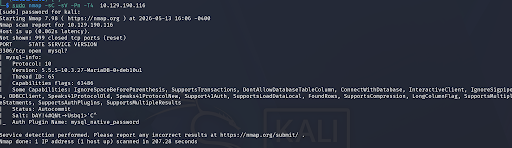
During our scan, which port do we find serving MySQL?
Answer: 3306What community-developed MySQL version is the target running?
Answer: MariaDBWhen using the MySQL command line client, what switch do we need to use in order to specify a login username?
Answer: -uGaining Database Access
With MySQL running on port 3306 the next step was to try connecting directly. I attempted to log in as root with no password:
mysql -h 10.129.190.116 -u root -p
ERROR 2026 (HY000) — The MySQL client was trying to connect with SSL/TLS encryption by default but the server doesn't have SSL configured so it rejected the connection.
Used the --skip-ssl flag to tell the client not to attempt SSL — bypassing the error entirely:
mysql -h 10.129.190.116 -u root --skip-ssl
With that fix applied the connection succeeded and access to the database was granted with no password required.
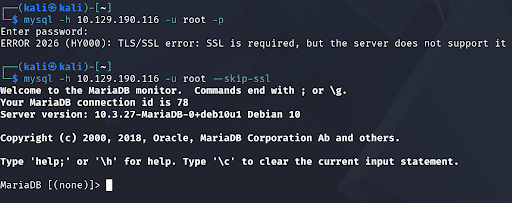
Which username allows us to log into this MariaDB instance without providing a password?
Answer: rootDatabase Enumeration
In SQL, what symbol can we use to specify within the query that we want to display everything inside a table?
Answer: *In SQL, what symbol do we need to end each query with?
Answer: ;With database access established I started enumerating what was available. First I listed all databases:
SHOW DATABASES;
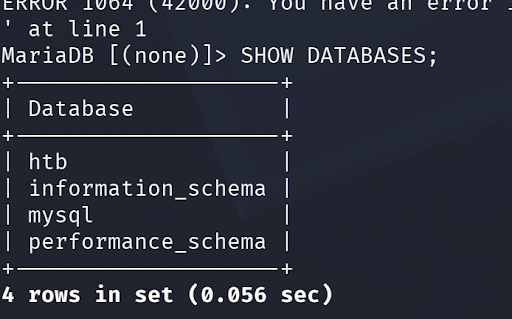
The three standard MySQL databases present on every installation:
information_schema · mysql · performance_schema
The fourth database unique to this host:
htb
There are three databases in this MySQL instance that are common across all MySQL instances. What is the name of the fourth that's unique to this host?
Answer: htbWhat is the command in MySQL to select a database to interact with?
Answer: USEWhat is the command in MySQL to show the different columns for a given table?
Answer: DESCRIBEI switched into the htb database and enumerated its tables and structure:
USE htb;
SHOW TABLES;
DESCRIBE config;
DESCRIBE users;
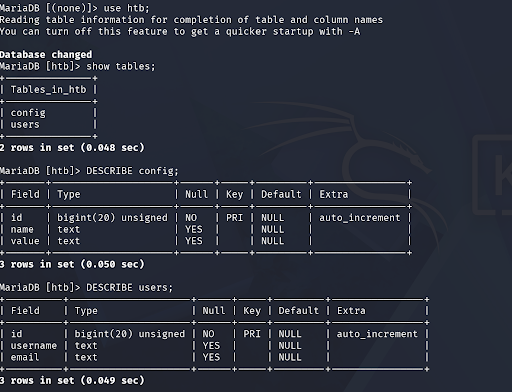
The column names from DESCRIBE didn't show anything called "flag" directly. My instinct was that the flag might be stored as a value inside a column rather than as a column name itself — so I queried the full contents of each table:
SELECT * FROM config;
SELECT * FROM users;
Retrieving the Flag
The SELECT * query dumps every row and column from the table. Running it against the config table revealed the flag stored as a value — exactly the kind of sensitive data that would be catastrophic to expose in a real database breach.
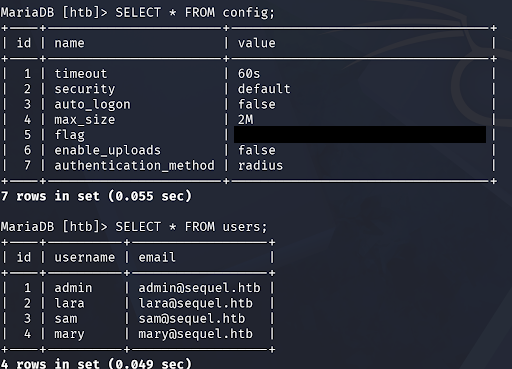
Which table has a column named "flag"?
Answer: configSubmit root flag:
Answer: flag captured ✓Validation

What I Learned
Unauthenticated database access is a critical vulnerability. Root access to a MySQL server with no password is one of the worst misconfigurations you can find. In a real penetration test this would be an immediate critical finding — full database access means full data exposure.
Errors are information, not dead ends. The SSL error (ERROR 2026) could have stopped the attack cold. Instead of giving up, researching what the error meant revealed a simple fix — --skip-ssl. In real engagements errors often point you toward misconfigurations worth exploiting.
DESCRIBE shows structure, SELECT shows data. DESCRIBE tells you what columns exist in a table. SELECT * tells you what values are stored. Both are essential — one without the other gives you an incomplete picture of what's in the database.
Flags aren't always named obviously. The flag wasn't stored in a column called "flag" — it was a value inside a column in the config table. When enumeration doesn't immediately reveal what you're looking for, dump the full table contents and look at the data itself.
Port 3306 is always worth checking. MySQL running on its default port with no firewall restriction is a common finding in real environments. Always scan for 3306 and always try unauthenticated access as root first — it works more often than you'd think.